How to set up a check for special characters?
Special characters refer to symbols, punctuation marks, and other non-alphabetic or non-numeric characters. Therefore they include everything that are non-special characters:
-
A-Z
-
a-z
-
0-9
-
_ (underscore)
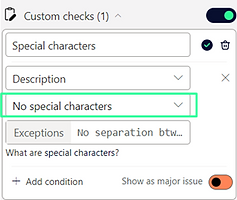
You can easily setup a custom check to test if a column has no special characters.
-
Go to Settings > Custom checks
-
Select the appropriate column
-
Select "No special characters"
-
Done
-
5. Or, write down exceptions
-
6. Write every character you would like to exclude from the check into the "Exceptions" field.
E.g., if you would like to accept "ß" just add it, if you would like to accept "ß" and "-" and " " (empty space) which is common for names in Germany, like "Voß" or the case for spaces in the Netherlands, like "van Berkeij" or hyphenated names, like "Ellie-May", write: "ß-·" (the "·" is just a visible change of the empty space we do for you):
