Which settings can be adjusted?
In the settings menu various choices can be made.
1 You can choose quality dimensions
to analyze or ignore (toggle on/off).

2 When opening the drop-down menu
for a quality dimension, you can choose which columns to analyze (option not available for horizontal analyses)
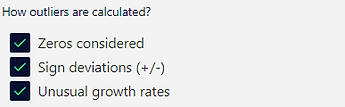
3 For outlier detection
you can choose
-
Sensitivity to detect outliers, i.e. set interquartile range
-
Explicit consideration of zeros in the analysis
-
Test for sign deviations, i.e. negative (positive) values in column with mainly positive (negative) values
-
Test for unusual growth rates
4 For duplicate detection
you can choose whether you only look for exactly matching characters or also fuzzy matches (only 80% of characters do need to match to identify a duplicate)

5 For formula issues
you can choose
-
References to empty cells
-
Rounding deviations
-
Hard-coded values in formula
-
References to other workbooks

6 For sensitive data det
you can choose what type of data you look for, i.e. email address, social security numbers, names, passport number, credit card, driver's license, phone number, IP address, IBAN
